// Server side: bind to a port and wait for a connection
ServerSocket serverSocket = new ServerSocket(3000);
Socket connection = serverSocket.accept(); // blocks until a client connects

// Client side: connect to the server
Socket socket = new Socket("localhost", 3000);Java Sockets
Overview
Matt Toegel matthew.toegel@njit.edu
What is a Socket?
A socket is a software endpoint that lets two programs communicate over a network
Think of it like a phone call:
One side dials (the client initiates the connection)
The other side answers (the server accepts the connection)
Once connected, both sides can send and receive data
Sockets are identified by two things working together:
An IP address - the address of the machine on the network
A port number - identifies which specific program on that machine to reach (like an apartment number within a building)
In Java, all networking classes live in the
java.netpackage
What are Sockets Used For?
Any time two programs need to exchange data over a network, sockets are involved
Common real-world examples:
Chat applications - messages are relayed between clients through a server
Online games - player positions and actions are sent in real time
Web browsers - your browser opens a socket to a web server to request a page
File transfers - bytes of a file are streamed from one machine to another
APIs and services - REST APIs, database drivers, and microservices all use sockets under the hood
In this course, we use sockets to build a multi-client chat server step by step to form a baseline for our projects
How TCP Sockets Work
The most common socket type uses TCP (Transmission Control Protocol)
TCP sockets form a persistent, reliable, two-way connection between two endpoints
Once connected, either side can send data at any time until the connection is closed
The general flow looks like this:
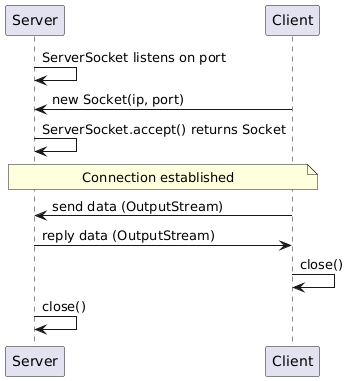
IP Addresses and Ports
Every machine on a network has an IP address (e.g.,
192.168.1.5)127.0.0.1is a special address called localhost - it always points to your own machineYou can also use the hostname
localhostinstead of the numeric address
A port number is a value between 0 and 65535 that identifies a specific service or program on a machine
Think of the IP address as the building, and the port as the apartment number
Ports 0-1023 are reserved (e.g., port 80 = HTTP, port 443 = HTTPS, port 22 = SSH)
Ports 1024-49151 are registered ports
Ports 49152-65535 are freely available for your own programs
This course uses port
3000by default (you can change it if needed)
Together, an IP address + port number is called a socket address
TCP vs UDP
There are two main protocols for sending data across a network: TCP and UDP
They make different trade-offs between reliability and speed
| TCP (Stream Sockets) | UDP (Datagram Sockets) | |
|---|---|---|
Connection | Requires a handshake to establish a connection before data flows | No handshake required - packets are sent directly to a destination |
Reliability | Guaranteed delivery - data arrives in order with no missing pieces | Best-effort delivery - packets may be dropped or arrive out of order |
Speed | Slightly slower due to connection setup and acknowledgment overhead | Faster - no handshake, no waiting for acknowledgment |
Data model | A continuous stream of bytes, like reading from a file | Individual self-contained packets (datagrams), each addressed independently |
When to use |
|
|
Java classes |
|
|
Rule of thumb: Use TCP when data must arrive correctly and completely. Use UDP when speed matters more than guaranteed delivery.
This course focuses on TCP sockets. UDP is covered here for awareness, but all hands-on work uses TCP.
TCP: Java Classes Socket and ServerSocket
ServerSocket- used on the server side to listen for incoming connectionsBinds to a specific port:
new ServerSocket(3000)Calling
accept()blocks (waits) until a client connects, then returns aSocketrepresenting that connectionThe server typically loops continuously calling
accept()to handle multiple clients
Socket- represents one active TCP connectionCreated on the client to initiate a connection:
new Socket("localhost", 3000)Also returned by
ServerSocket.accept()on the server sideProvides
getInputStream()andgetOutputStream()to send and receive data
Example: Creating a Connection
Example: Port Already in Use
Only one
ServerSocketcan bind to a given port at a time. Attempting to start a second server on the same port throws aBindException:
ServerSocket server1 = new ServerSocket(3000); // ok - port 3000 is now claimed
ServerSocket server2 = new ServerSocket(3000); // throws java.net.BindException: Address already in use
This is a common mistake when you forget to stop a previous run or accidentally launch two copies of your program - check that the port is free before binding
UDP: Java Classes DatagramSocket and DatagramPacket
DatagramSocket- used to send and receive UDP packetsNo connection is established - you can send to any address at any time
Core methods:
socket.send(packet)to send,socket.receive(packet)to wait for incoming dataBoth client and server sides use
DatagramSocketdirectly
DatagramPacket- wraps the data for a single UDP transmissionContains the raw bytes, the destination IP address, and the destination port
Each packet is self-contained - the receiver processes it individually
I/O Stream Wrappers
Socket.getInputStream()andSocket.getOutputStream()return raw byte streamsYou almost always wrap them in a higher-level class for convenience:
| Wrapper | Best For |
|---|---|
|
|
Important: Both sides of the connection must use matching wrappers
If the server writes with
ObjectOutputStream, the client must read withObjectInputStreamMismatched stream types will cause errors at runtime
Example: Wrapping Streams
Socket socket = new Socket("localhost", 3000);

// Text-based: good for simple line-by-line communication
PrintWriter out = new PrintWriter(socket.getOutputStream(), true);
BufferedReader in = new BufferedReader(new InputStreamReader(socket.getInputStream()));
out.println("Hello!");
String response = in.readLine(); // blocks until a full line arrives

// Object-based: used from Part 1 of the MCCS series onward
// Always create ObjectOutputStream first on both sides to avoid deadlock
ObjectOutputStream objOut = new ObjectOutputStream(socket.getOutputStream());
ObjectInputStream objIn = new ObjectInputStream(socket.getInputStream());
objOut.writeObject("Hello!");
String received = (String) objIn.readObject(); // blocks until an object arrives
Blocking Operations and Threads
Many socket operations are blocking - the program pauses and waits until something happens
ServerSocket.accept()blocks until a client connectsInputStream.read()orreadObject()blocks until data arrivesScanner.nextLine()blocks until the user types something
Blocking in the main thread means the program can’t do anything else while waiting
The solution is threads - run blocking operations in their own thread so other work can continue
This becomes critical in our practical baseline when we need to:
Listen for user input and listen for server messages at the same time
Handle multiple clients connecting to the server simultaneously
Modern Java (JDK 21+) introduced virtual threads which make socket-heavy programs more efficient, but the core API (
Socket,ServerSocket) works exactly the same way
Example: Blocking Calls and the Thread Fix
// All three of these pause the current thread until they complete:
Socket client = serverSocket.accept();  // waits for a client to connect
String data   = (String) in.readObject(); // waits for incoming data
String line   = scanner.nextLine();     // waits for the user to type

// Solution: run each blocking call in its own thread
new Thread(() -> {
    String msg = (String) in.readObject();
    System.out.println("Received: " + msg);
}).start();
// the main thread continues here immediately
What’s Coming in the Sockets Series
The following parts build a multi-client chat server from scratch:
| Part | What You Will Build |
|---|---|
Part 1 | A multi-client TCP chat server using threads, |
Part 2 | Introducing a |
Later Parts | Additional features to be announced - may include separate rooms or lobbies (formerly was Part 4 out of the 5 part series) |
Read and complete the parts in order - each one builds directly on the previous
Part 1 involves threads and is a notable jump in complexity - review this overview and the OOP Intermediate material before starting