<?php
//TODO 1: require db.php
require(__DIR__ . "/db.php");
//require safer_echo.php
require(__DIR__ . "/safer_echo.php");
//TODO 2: filter helpers
require(__DIR__ . "/validations.php");
//TODO 3: User helpers
require(__DIR__ . "/user_helpers.php");
//TODO 4: Flash Message Helpers
?>Intro to PHP Templating & Some Helper Functions
Matt Toegel matthew.toegel@njit.edu
Prelude
| Requires the lessons up to and including Navigation & Login Part 2 to have been completed |
Checkout
Milestone1Pull any latest changes
Create a new branch
Feat-MS1-HelperFunctions
Helper Functions
Let’s work on modularizing our code to avoid lengthy and repetitive code
We’ll update our
functions.phpto include some helper functionsThen we’ll make two new files in the
libfolder to hold our sanitizers/validations and user helpersInside the
libfolder, create a new file calledvalidations.phpand another calleduser_helpers.phpThe sub-sections will cover the contents of these files
functions.php
Pulls in the
validations.php(TODO 2) anduser_helpers.php(TODO 3) files viarequire()
validations.php
<?php

function sanitize_email($email = "") {
    return filter_var(trim($email), FILTER_SANITIZE_EMAIL);
}
function is_valid_email($email = "") {
    return filter_var(trim($email), FILTER_VALIDATE_EMAIL);
}Contains reusable email validation/sanitization functions
Uses the
filter_var()function to validate and sanitize email addresses
| This encapsulation allows us to easily update the email validation logic in one place, ensuring consistency across the application. |
user_helpers.php
<?php
/**
 * Checks if user key is set in session
 */
function is_logged_in() {
    return isset($_SESSION["user"]);
}
/**
 * Returns the current user's username or empty string
 */
function get_username() {
    if (is_logged_in()) { //we need to check for login first because "user" key may not exist
        return se($_SESSION["user"], "username", "", false);
    }
    return "";
}
/**
 * Returns the current user's email or empty string
 */
function get_user_email() {
    if (is_logged_in()) { //we need to check for login first because "user" key may not exist
        return se($_SESSION["user"], "email", "", false);
    }
    return "";
}
/**
 * Returns the current user's id or -1
 */
function get_user_id() {
    if (is_logged_in()) { //we need to check for login first because "user" key may not exist
        return se($_SESSION["user"], "id", -1, false);
    }
    return -1;
}Contains the following helpers
is_logged_in(): Checks if the user is logged in by verifying the sessionget_username(): Returns the username of the logged-in userget_user_email(): Returns the email of the logged-in userget_user_id(): Returns the ID of the logged-in user
These functions simplify access to user data and ensure that we don’t have to repeatedly check the session or database for this information
Putting the Helpers to Use
In
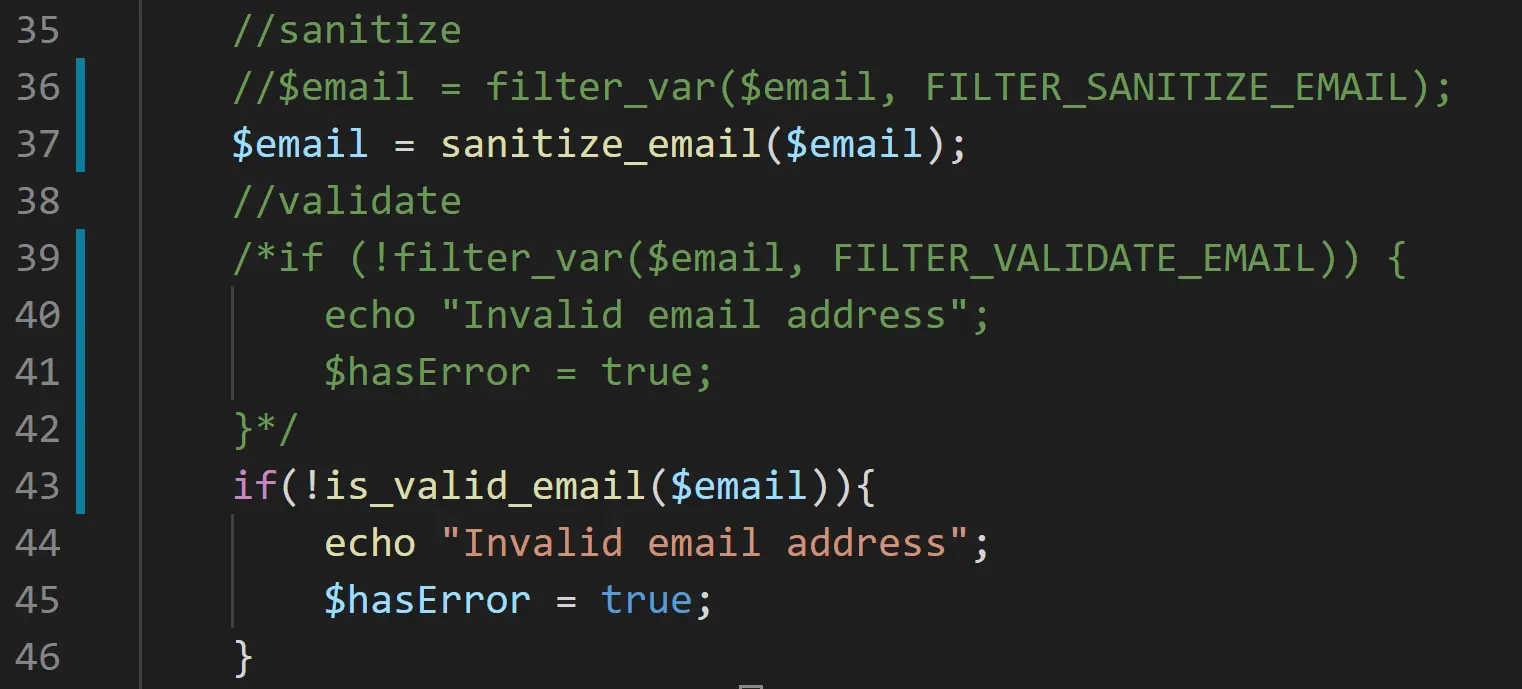
register.phpandlogin.php, replace the email validation/sanitization with the helper functions we just added (screenshot 1)This ensures consistency between both pages since they both refer to a single function for this functionality
In
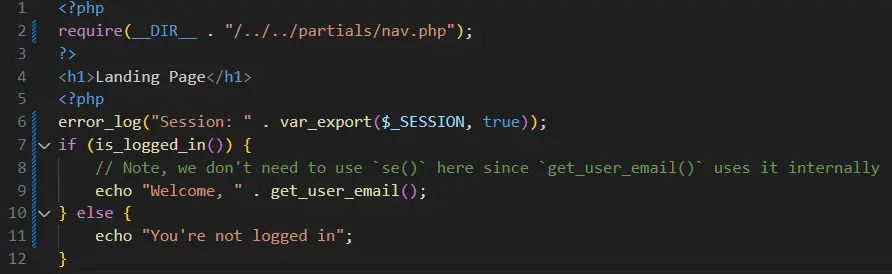
landing.php, change it to what’s in screenshot 2Now anywhere we need to use this data, we can easily use our helper functions to simplify development
| As you develop your project, look for functionality you replicate often, these are likely candidates to extract into a function for reusability |
| Screenshot 1 (login/register) | Screenshot 2 (landing) |
|---|---|
|
|
PHP Templating: Conditional HTML
PHP templating smoothly mixes our PHP and HTML via conditional statements
PHP tags can be placed throughout the page, allowing conditional HTML output (if the expression is true, the HTML is sent to the browser)
We’ll use core PHP mechanics instead of a templating engine; but it still allows our IDE to properly validate both PHP and HTML
Major benefits include:
Reusability
Better syntax validation
Always sanitize user input before outputting it to the browser. Remember, our se()/safer_echo() function does this for us, so use it whenever you output user data. But normally you would use htmlspecialchars() |
Implementing Templating in nav.php
Go to your
nav.phpand update its content with:
<nav>
    <ul>
        <!-- new content below -->
        <?php if (is_logged_in()) : ?> (1)
            <li><a href="landing.php">Home</a></li>
        <?php endif; ?> (2)
        <?php if (!is_logged_in()) : ?>
            <li><a href="login.php">Login</a></li>
            <li><a href="register.php">Register</a></li>
        <?php endif; ?>
        <?php if (is_logged_in()) : ?>
            <li><a href="logout.php">Logout</a></li>
        <?php endif; ?>
    </ul>
</nav>| 1 | The navigation links are conditionally displayed based on the user’s logged-in state |
| 2 | The HTML is not sent to the browser if the condition is false |
Adjustments will be made later for links available only to certain user roles
We’ll see more templating as we proceed; in the meantime ensure you follow proper syntax for a clean combination of PHP and HTML
Try logging and and logging out and note the changes in the navigation bar
Summary
This lesson was about preparing to work smarter by building reusable components via functions, partial files, or both
Reusability centralizes logic, making future changes easier
Going forward, you’ll need to implement similar concepts
Add and commit these changes to
Feat-MS1-HelperFunctions, push the changes to GitHub, and create a pull request toMilestone1.git add .git commit -m "added helper functions and templating for navigation"git push origin Feat-MS1-HelperFunctions
Finally, merge and pull the latest changes from
Milestone1git checkout Milestone1git pull origin Milestone1
Checkpoint: https://github.com/MattToegel/IT202-2025/tree/Module04-HelperFunctions
Note: My branch name differs from yours so I can isolate the lesson content