Java Sockets
Multi-Client Chat Server Part 1
Matt Toegel matthew.toegel@njit.edu
Goal
Build a multi-client chat server where any number of clients can connect and exchange messages
Use
ObjectInputStreamandObjectOutputStreamfor all data transfer over the socketThese classes send Java objects directly over the wire - a
Stringis a Java object, so we can use them immediatelyThis sets the foundation for Part 2 where we replace raw strings with a structured
Payloadclass
Support a
/userscommand - the server generates the current user list and sends it back to the requesting clientPrep
git checkout main(ensure you’re on the main branch)git pull origin main(pull any latest changes)git checkout -b Module04-Sockets-MCCS-Part1(create a new branch for this lesson)
Architecture Overview
There are two programs: a Server and one or more instances of Client
The Server runs continuously, accepting new Client connections
Each connected Client gets its own
ServerThreadon the Server - this is how the Server handles many clients at the same timeClients send strings to the Server; the Server broadcasts them to all connected Clients
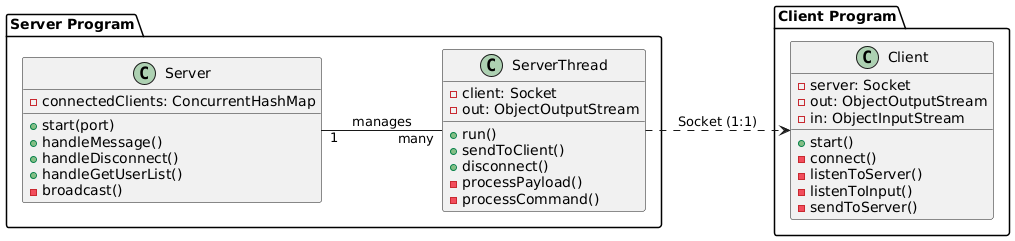
Background: Threads
If you haven’t read the sockets overview yet, review the Blocking Operations and Threads section first - this lesson assumes you understand what blocking is and why threads are needed
Remember: A thread is a single flow of execution
Here is how threads apply specifically to this codebase:
The Server runs
accept()on the main thread, hands each new connection off to a newServerThread, and immediately goes back to waiting for the next oneEach
ServerThreadblocks onreadObject()independently - one slow or disconnected client does not hold up any of the othersThe Client runs
listenToServer()in a background thread so it can receive messages while simultaneously reading keyboard input on the main thread
Resources:
Communication Patterns
When sending data across a network, there are three distinct patterns:
Unicast - one sender, one specific receiver
Example: the server sends the user list only to the client who requested it
Broadcast - one sender, all receivers unconditionally
Example: a chat message is relayed to every connected client regardless of any grouping
This is the pattern this lesson implements
Multicast - one sender, a subscribed group of receivers
Example: a message sent only to clients who have joined a specific room or group
Using the correct term matters - calling a broadcast a "multicast" implies group subscription logic that does not exist yet
Helper Files
Constants.java
An
abstractclass holding shared constant values used across all classesMaking it
abstractprevents instantiation - no one should ever donew Constants()
Properties:
COMMAND_TRIGGER- the string prefix that marks a message as a command (e.g.,"[cmd]")DEFAULT_CLIENT_ID- value of-1L, used to represent an unassigned client id
| Centralizing constants avoids "magic strings" - hardcoded text scattered across files that is easy to mistype and hard to maintain |
TextFX.java
A utility class for printing colored text to the terminal
Used throughout for readability when debugging (e.g., received messages in cyan, commands in yellow)
Be careful when importing
Colorfrom this class - it can conflict withjava.awt.Coloronce UI is introducedTextFX.java: https://github.com/MattToegel/IT114-2026/blob/Module04-Sockets-MCCS-Part1/M4/MCCS/Part1/TextFX.java
ServerThread
ServerThreadextendsThread, making each instance its own independent flow of executionEvery connected Client gets exactly one
ServerThreadon the Server side - a 1:1 relationshipIt is responsible for all sending and receiving with its specific Client
The following subsections cover the properties and methods of
ServerThreadin detail, but the overall flow is:The Server accepts a new connection and creates a
ServerThreadfor itThe
ServerThreadopens its streams and enters a loop blocking onreadObject()When a message is received, it checks if it’s a command; if not, it passes it to the Server to broadcast to all clients
If the client disconnects or an error occurs, it cleans up and exits
ServerThread Properties
Socketnamedclient- the communication channel to this specific connected clientvolatile booleannamedisRunning- controls the read loopWithout
volatile, the JVM is allowed to cache a field’s value per-thread for performance - one thread could set it tofalsebut another thread might still see the staletruevalue from its own cachevolatileforces every read to go to main memory, so all threads immediately see the latest valueThis matters because
disconnect()can be called from a different thread than the one runningrun()
ObjectOutputStreamnamedout- used to send data back to this clientStored as a field so
sendToClient()can access it after it’s initialized insiderun()
Serverreference namedserver- provides access to server-level actions likehandleMessage()longnamedclientId- a unique identifier for this client; currently set tothis.threadId()Consumer<ServerThread>namedonInitializationComplete- a callback to notify theServeronce this thread is fully ready to receive dataConsumer<T>is a functional interface fromjava.util.function- it holds a reference to a method that accepts one argument and returns nothingHere it stores a reference to the
Server’s `onServerThreadInitialized()method, to be called when setup is done
ServerThread Constructor
Takes the
Socket, aServerreference, and the callbackUses
Objects.requireNonNull()to validate each argumentThis causes a clear, immediate failure if something is passed incorrectly rather than crashing later with a confusing error
Create ObjectOutputStream before ObjectInputStream on both sides of the connection. The constructors exchange stream header bytes, and if both sides try to read first, the program will deadlock - each waiting for the other to send first. |
ServerThread: run()
Called automatically when
serverThread.start()is called by theServerOpens the
ObjectOutputStreamfirst, thenObjectInputStream, using try-with-resources so both close automatically when the block exitstry-with-resources automatically calls
close()on any declared resource when the block exits, whether it exits normally or due to an exception - no manual cleanup needed for the streams
Sets
isRunning = trueand firesonInitializationCompleteto notify theServerEnters a loop blocking on
in.readObject():If the result is
null, the client disconnected - throw anIOExceptionto break cleanlyOtherwise, pass the received string to
processPayload()A
ClassCastExceptionhere means the other side sent an unexpected type - log it but continueAn
IOExceptionduring read usually means the connection dropped - break out of the loop
The
finallyblock always runs, ensuringcleanup()is called even on unexpected exitsfinallyruns whether thetryblock completes normally, throws an exception, or hits abreak- it is the guaranteed cleanup point
ServerThread: processPayload() and processCommand()
processPayload(String incoming)is the entry point for all data received from the ClientPasses the incoming string to
processCommand()firstIf
processCommand()returnsfalse, the message was not a command, so passes it toserver.handleMessage(this, incoming)to be broadcast to all clients
processCommand(String message)checks for theConstants.COMMAND_TRIGGERprefixExpected format:
[cmd],commandNameor[cmd],commandName,dataSplits on
,to extract the command name at index 1Recognized commands:
disconnect- callsserver.handleDisconnect(this)to cleanly remove this clientusers- callsserver.handleGetUserList(this)to send the user list back to just this client
Returns
trueif a command matched and was processed,falseotherwise
This [cmd] string format is intentionally simple for now. In Part 2 it is replaced by a Payload class which is more structured and easier to extend. |
ServerThread: sendToClient()
Accepts a
Stringand writes it tooutviaout.writeObject()Calls
out.flush()immediately after to push the data out of any internal bufferReturns
trueon success,falseif anIOExceptionoccursA failed write almost always means the client disconnected - the
run()loop will detect the broken state and thefinallyblock handles cleanup
ServerThread: disconnect() and cleanup()
disconnect()- intended to be called from outside this thread (e.g., byServer) to stop itChecks
isRunningfirst to prevent running twice if called repeatedlySets
isRunning = false, then callsthis.interrupt()to wake up the blockingreadObject()callDoes not call
cleanup()directly - thefinallyblock inrun()always runs after the loop exits and handles cleanup there
cleanup()- closes theclientSocketThe streams themselves are closed automatically by the try-with-resources in
run()
ServerThread.java: https://github.com/MattToegel/IT114-2026/blob/Module04-Sockets-MCCS-Part1/M4/MCCS/Part1/ServerThread.java
Server
The
Serverclass is the central coordinator - it manages allServerThreadsand routes data between themRuns on the main thread; does not extend
Thread
Server Properties
intnamedport- the port to listen on (default3000)ConcurrentHashMap<Long, ServerThread>namedconnectedClients- maps eachclientIdto itsServerThreadA regular
HashMapis not safe when multiple threads access it simultaneouslyConcurrentHashMaphandles concurrent reads and writes without requiring manual locking on every access
booleannamedisRunning- controls the main accept loop
Server: start()
Creates a
ServerSocketbound to the specified port - the OS will reject connections to any other portLoops calling
serverSocket.accept()(blocking) to wait for the next incoming connectionOn a new connection:
Creates a new
ServerThread, passing the socket,this, and thethis::onServerThreadInitializedcallbackthis::onServerThreadInitializedis a method reference - shorthand for(st) → this.onServerThreadInitialized(st); it passes the method itself as a value without calling it yet
Calls
serverThread.start()to begin the threadThe Server does not add the
ServerThreadtoconnectedClientsyet - that happens in the callback after initialization succeedsImportant:
run()must open the streams before anyone can send data to this client. Adding to the map before the streams are ready would cause aNullPointerExceptionif another client’s broadcast arrived too early
Server: onServerThreadInitialized()
The callback fired by a
ServerThreadonce its streams are open and it’s ready to send/receive dataAdds the
ServerThreadtoconnectedClientsusingclientIdas the keyCalls
broadcast(null, …)to send a join message to all currently connected clientsThis runs on the new `ServerThread’s own thread, not the main Server thread
Server: broadcast()
Sends a formatted message to every entry in
connectedClients- this is a broadcast (one sender, all receivers unconditionally)Builds the sender label:
User[123]for a client,ServerifsenderisnullIterates using
connectedClients.values().removeIf(…):removeIf()accepts a lambda - an inline function written ascondition → result- and calls it once per entry; returningtrueremoves that entry,falsekeeps itCalls
sendToClient()on eachServerThreadIf the send fails,
removeIf()removes that entry from the map (the lambda returnstrueon failure)This cleanly prunes disconnected clients during the broadcast without a separate pass
Marked
synchronized- multipleServerThreadscan call methods onServerat the same time, andsynchronizedensures only one executes the method at a time, preventing two threads from modifyingconnectedClientssimultaneouslyAll
handle*methods andbroadcast()aresynchronizedon the sameServerinstance, so they form a single lock - only one can run at a time across all of them
Server: handleGetUserList()
Called when a client sends the
/userscommandBuilds a formatted string listing all connected
clientIdvalues fromconnectedClientsThe requesting client’s own entry is tagged with
(you)so they can identify themselves in the list
Sends the result only to the requesting
ServerThreadusingserverThread.sendToClient()directlyThis is a unicast (one sender, one receiver) - only the client who asked sees the list
Marked
synchronizedsince it reads fromconnectedClients
Server: handleMessage() and handleDisconnect()
handleMessage(ServerThread sender, String text)- callsbroadcast()to send the message to all clientshandleDisconnect(ServerThread sender)- calls the privatedisconnect()methodPrivate
disconnect()callsserverThread.disconnect(), removes the entry fromconnectedClients, and broadcasts a disconnect notice to remaining clients
Server.java: https://github.com/MattToegel/IT114-2026/blob/Module04-Sockets-MCCS-Part1/M4/MCCS/Part1/Server.java
Client
The
Clientclass is the user-facing programTwo blocking operations need to run at the same time:
Reading incoming messages from the server
Reading keyboard input from the user
These are split into separate threads so neither blocks the other
Client Properties
Socketnamedserver- the connection to the ServerNamed from the client’s perspective: this socket represents the server end of the channel
ObjectOutputStreamnamedoutandObjectInputStreamnamedin- the communication channelsPatternreferencesipAddressPatternandlocalhostPattern- regex patterns to recognize a/connectcommandvolatile booleannamedisRunning- shared between the main thread and thelistenToServer()background thread
Client: Command Enum
A
Commandenum defines the recognized client-side commandsMakes command matching cleaner and less error-prone than comparing raw strings with
equals()Values:
CONNECT,DISCONNECT,QUIT,USERS,REVERSE
processClientCommand()uses this enum to route to the correct action
Client: connect()
Takes a host string and a port number
Creates a
Socketto the ServerOpens
ObjectOutputStreamfirst, thenObjectInputStreamOrder must match the server - both sides create output before input
Starts
listenToServer()in a background thread usingCompletableFuture.runAsync()runAsync()submits the method to a shared thread pool and returns immediately, soconnect()doesn’t block
Returns
trueif the connection succeeded
Client: listenToServer()
Runs in the background thread started by
connect()Loops on
in.readObject()- blocks until the server sends somethingPrints each received string to the console
On
nullor anyIOException, exits the loop and callscloseServerConnection()in afinallyblock
Client: listenToInput()
Runs as the primary input handler (inside a
CompletableFutureinstart())Loops reading from
Scanner(System.in)- eachnextLine()call blocks until the user presses EnterPasses each line to
processClientCommand()If no command matched, calls
sendToServer()to send it as a chat message
Client: processClientCommand()
Uses the
Commandenum to identify the user’s intentRecognized commands:
CONNECT(/connect host:port) - extracts host/port using regex and callsconnect()QUIT(/quit) - callsclose()to terminate the programDISCONNECT(/disconnect) - sends[cmd],disconnectto the ServerUSERS(/users) - sends[cmd],usersto the Server, which replies with the user listREVERSE(/reverse text) - sends the text to the Server to be reversed and broadcast back
Returns
trueif a command was processed,falseif it was a regular message
Client: sendToServer()
Calls
out.writeObject(message)andout.flush()Prints a helpful hint if not yet connected
Client: close() and closeServerConnection()
close()- setsisRunning = falseand callscloseServerConnection()closeServerConnection()- closesout,in, andserverin three separate try-catch blocksSeparate blocks ensure that even if one resource fails to close, the remaining ones still attempt to close
Client.java: https://github.com/MattToegel/IT114-2026/blob/Module04-Sockets-MCCS-Part1/M4/MCCS/Part1/Client.java
Running the Sample
Note: Use the CLI instead of the IDE’s "run" button
Assumes code is under a
M4/MCCS/Part1/folder structure (adjust as needed):javac M4/MCCS/Part1/Server.java(compile the server and its dependencies)java M4.MCCS.Part1.Server(run the server - default port 3000)javac M4/MCCS/Part1/Client.java(compile the client)java M4.MCCS.Part1.Client(run the client)
Open at least two terminal windows and start a Client in each
Type
/connect localhost:3000in each to connectType a message and press Enter - both clients should see it
Type
/usersto see the current list of connected client idsType
/disconnectto disconnect from the server
| Run the Server first. A Client that tries to connect before the Server is listening will immediately fail. |
Remember:
javacuses the file system path with slashes;javauses the package path with dots
Summary
A multi-client chat server using
ObjectInputStreamandObjectOutputStreamfor all data transferKey concepts covered:
A
Threadper client (ServerThread) allows the Server to handle many connections in parallelConcurrentHashMapsafely tracks connected clients across multiple threadsThe
Consumer<ServerThread>callback pattern letsServerThreadnotifyServerwhen it is ready withoutServerhaving to poll for readinessBroadcasting with
removeIf()cleanly prunes failed connections during message deliveryUnicast (single client reply) and broadcast (all clients) as two distinct patterns - multicast (subscribed group) will be introduced when rooms are added
Current limitations (to be addressed in later parts):
Clients are only identified by a thread-generated id - there are no usernames yet
Client join and disconnect events are not automatically pushed to everyone - the user list is only accurate at the moment
/usersis sentThe
[cmd],command,datastring format is functional but rigid - Part 2 replaces it with aPayloadclass
Part 1 Checkpoint: https://github.com/MattToegel/IT114-2026/tree/Module04-Sockets-MCCS-Part1
Additional Resources
Wrap Up
git add M4(track changes)git commit -m "add Module04-Sockets-MCCS-Part1 sample code"(commit changes)git push origin Module04-Sockets-MCCS-Part1(push changes to GitHub)Create a pull request to
mainand merge itgit checkout main(switch back to main branch)git pull origin main(pull latest changes)